Showing posts with label tech for learning. Show all posts

Wednesday, December 27, 2017

Six Things We Learned So Far In Our Middle School MACUL Grant Project

Updates 2/19/2018:  Lots of new things have been added since I wrote this in December.


I've written here and here about our middle school math project funded with a MACUL grant. We've been making learning videos for and with students in 6th grade math. We post the final videos at Room10LearningChats.com.

Since I'm an instructional tech coordinator and not a classroom teacher, I've been working with Brenda June's students. This exciting project that has required us to stretch as professionals. We meet several times a week to plan videos and discuss what we are learning.

As you'll read below, it has been challenging at times. Our goal now is to glean the many excellent things we are learning from it so teachers can do the same without spending all the time we have. We will share those insights here, in our videos and at the MACUL Conference in March.

Here's a summary of big ideas and some practical insights we've learned so far.

1)  Students love making videos for other students. When I wrote the grant proposal, I hoped this would be the case with most students. But when we started out, the enthusiasm I saw in class surprised me. Initially we kicked off the project in every one of Brenda's classes. Out of more than one hundred students, I only saw slight resistance from one student when we asked them to make their first video. Within minutes, even that student was engaged in the task.

Before we had anything like an audience for our videos, students excitedly ended their lessons with phrases like, "Thanks for watching," and, "Be sure to see our other videos."

As you'll see in my next point, this is not the dream project to solve all the challenges of teaching math in middle school. Still, the idea of helping others learn and sharing their work with a wider audience changed class from the "got to do this" mindset to "get to do this".

2)  It's harder than I expected to do this on a large scale. There's no way around it. This is a challenge and we are trying to figure out exactly what we recommend for other teachers to try. I did learn a few practical things that I'll list below, but student created tutorials take a lot of time and effort.

I make a lot of video tutorials and I've worked with students for years to make them in class. I didn't think technical problems would take so much time. On top of that, it's difficult to find time during class for students to get free to record a tutorial. Some of this is unique to our situation. I wrote the original proposal for a different class at the elementary level, but that teacher ended up in a new position. Brenda was glad to try this project, but we almost certainly would have written different details for use in her secondary classroom.

Here are just a few unexpected things I ran into:

  • We want to focus on why more than how in our lessons, but it requires students multiple takes just to successfully show how to do the problems. As I mentioned, attitudes have been great, but it surprised me how long it would take to work through a multi-step problem without a mistake. 
  • The microphone was picking up far more than just our narration, and sometimes not even our narration! After recording our first "polished" tutorial, we realized every time the students touched the table, it was being recorded as a loud thud by the microphone. Add another 15 minutes (1/4 of class time) to that one!
  • Even if the explanation and math work is perfect, students might mumble, misspeak or write illegibly. There's a lot to get right!
  • Editing takes longer than expected because of the mistakes. We've improved in this greatly, but our student created tutorials are much simpler and less polished than I originally envisioned. I thought I'd be able to get by with students doing most editing in iMovie on an iPad or WeVideo on Chromebooks. Instead I've had to do the editing and some of it has been very complex. I need higher end software too. More on this below.
3)  Focused discussion with colleagues is invaluable. This has been a key takeaway, as Brenda and I have had to spend hours working together on this project. We already knew collaboration is valuable, since we met almost weekly last year and have done many other projects together. This one has been particularly helpful, though, because we want our Learning Chats to focus on how to learn deeply.

Brenda and I read Mathematical Mindsets and a lot of other research about good teaching. She has spent her career constantly improving how she teaches and she's been focused on excellent discussion techniques in class for the past year. This project came at a good time, since she is excited about what her questions in class have uncovered and how we can address the misconceptions and gaps the students have in their learning.

It might not be completely clear in the videos we've completed so far, but what we've discovered and how we see it impacting students has been invigorating. Our most popular video so far touches on some of this. Be sure to watch The Learning Journey if you haven't seen it already. Part 2 should be available soon.

4)  You can see (and hear) students' misconceptions by having record their explanations. We suspected this of course. I mention it here because it's another sign that we're onto something important. When we first started the project, we had every student make a quick, informal video tutorial. Had they done their work only on paper, many of the problems would have looked correct. Hearing the thinking (or lack of thinking) behind each of their steps gave us much more insight. 

5)  Practice before recording is the key. This will also seem obvious, but it is worth mentioning. Anyone who has made a video knows that better preparation for recording saves a ton of time in editing. More than that, though, the practice I do with students before recording a Learning Chat gives me an opportunity to ask good questions and get them thinking about why they are doing what they do. A good example of this came from our tutorial about multiplying fractions. The discussion we had before recording that required the students to think more deeply than they were about the process. It also was one of our easiest to produce.

6)  We know better which tools work and which don't. Here are some specifics:
  • We decided on Educreations for informal tutorials in class. We tried Show Me first, but went with Educreations in the end when we wanted every student to record their work. We ran into fewer technical challenges with it. You can see two examples at the bottom of this page. It costs about $12 a month for the premium version that allows for easy sharing with the teachers.
  • I used to love Explain Everything on the iPad and I expected this would be the main tool for all of our polished tutorials. Well, they have added a lot of features since I used it and that has added to the complexity. It's still a great tool, but it's too complicated for the students. It posed challenges for me and Brenda as well. And it's over three times as expensive as it was when I bought it years ago. For now, I set up the problems and pages in Google Slides and then transfer them over to Explain Everything for the students to write on during recording. If they only write on it rather than construct all the slides with it, it serves its purpose well.
  • I absolutely love Camtasia for editing. It's expensive, but I get a free copy as a Google Certified Trainer. I've used it for years to make screen recordings, but recently I've started using it for all types of video. The animation features are excellent and the ability to quickly work with multiple layers is extremely helpful. I highly recommend it if you create professional tutorials or videos.
  • We use the iRig Studio microphone with an iPad to record narration. I like it, but as I mentioned above, it picks up every tap or movement on the table. I'm sure there are some shock mounts that would help, but our low budget approach has been to set it on a folded cloth, such as a towel or (in a pinch) a student's hoodie or stocking cap. 
So that's a summary of what we've gained so far. I look forward to creating many more videos over the next eight weeks as we prepare to share in our MACUL presentation!

Sunday, May 15, 2016

5 Myths About Ed-Tech That Keep You (And Your Students) From Being Amazing

It might not look like it, but the infographic below is my story from the past few years as I worked with several teachers. In that time I regularly heard the same misconceptions from them as I encouraged more tech integration and creative projects in all classes.

I call these misconceptions and myths, but in reality they started to sound more like excuses. That's understandable. We all know change isn't pleasant.

But whether someone actually believes these myths and is looking for a way to innovate or if they've just used them as a reason to do business as usual, I'm countering each of myth with a few ideas that I know to be true.

I and the many teachers I work with are not perfect examples of innovative educators, but together we've seen that change is possible. We've seen that a technology project in a core subject can let students shine in exciting ways. We've realized that when it all doesn't go perfectly, it's not a bad thing to struggle and learn in front of the students.

So I put some of the things I learned into the infographic below. You can view the full image here.

I have each frame of it below along with thoughts, resources and links than I could include in the graphic.
__________________________

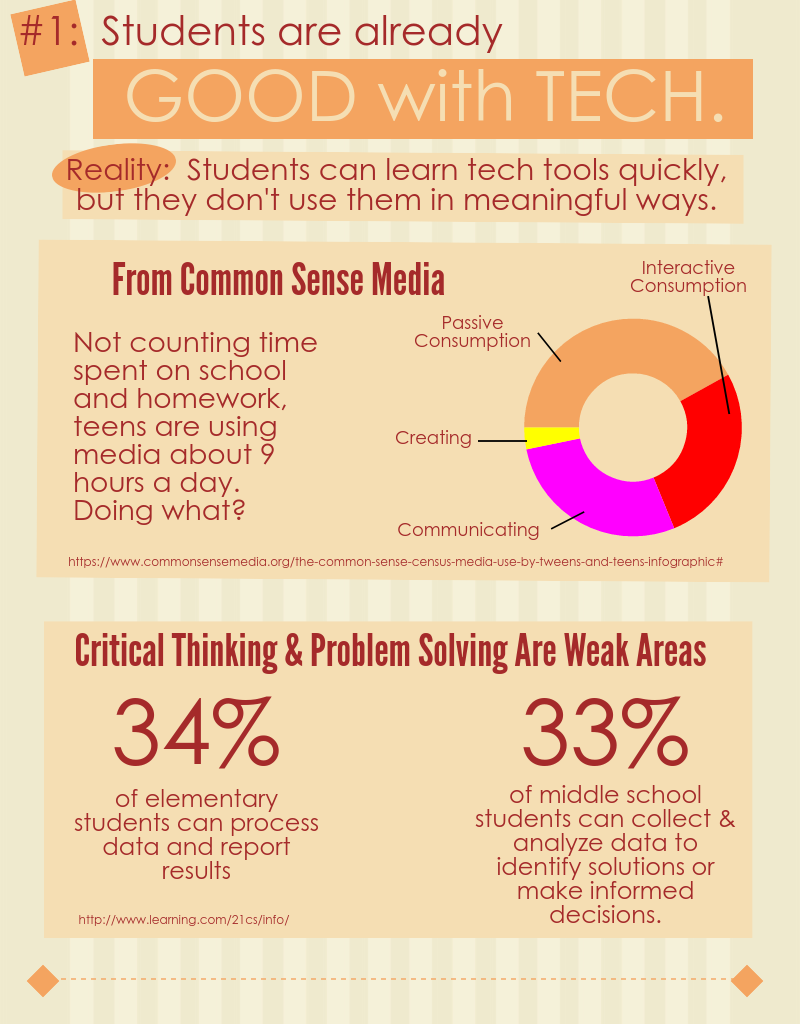
Myth #1:  Students are already good with tech.


Reality:  Students learn tech tools quickly, but they don't use them in meaningful ways.

I've been impressed with how quickly students can learn to use new tools. Not intimidated by tech, they jump in and figure out how to make it do what they want almost immediately.

When it comes to doing something meaningful, though, they have a lot to learn. If we look for evidence of skills for success in today's world, such as writing a blog post someone would read or making a persuasive, watchable video, we can see there's a lot of room for learning.

I included a few stats in the infographic to support this. They're from these studies:


To illustrate how quickly students can learn new tools, this post and this one give examples of how I introduced students to iMovie. Many times it's just a matter of showing them what's possible first.


Myth #2:  We haven't had enough good professional development.


Reality:  You can take charge of your own PD.

I'm glad when I see some teachers discover they really don't need me. They realize a quick Google search or a video on YouTube can help them learn what they needed.

The main idea for this section of the infographic came out of an informal survey I sent out to my PLN (and some of them shared with their own). I wrote about it in detail in this post. The big take-aways are in this slide.

  • Over 70% of the respondents said they learn new tech tools on their own or from colleagues.
  • Only around 2% of them claimed that traditional styles of district provided PD helped them learn to use the tech tools they rely on in the classroom.
Now, it is my job to help teachers and I'm not trying to get out of that responsibility. My point is that we can't just stay where we're at, always waiting for that perfect PD session to give us what we need. Limited budgets and different needs makes it an unlikely scenario. Besides that, the vast majority of the people making a difference do not attribute their success to such an experience.


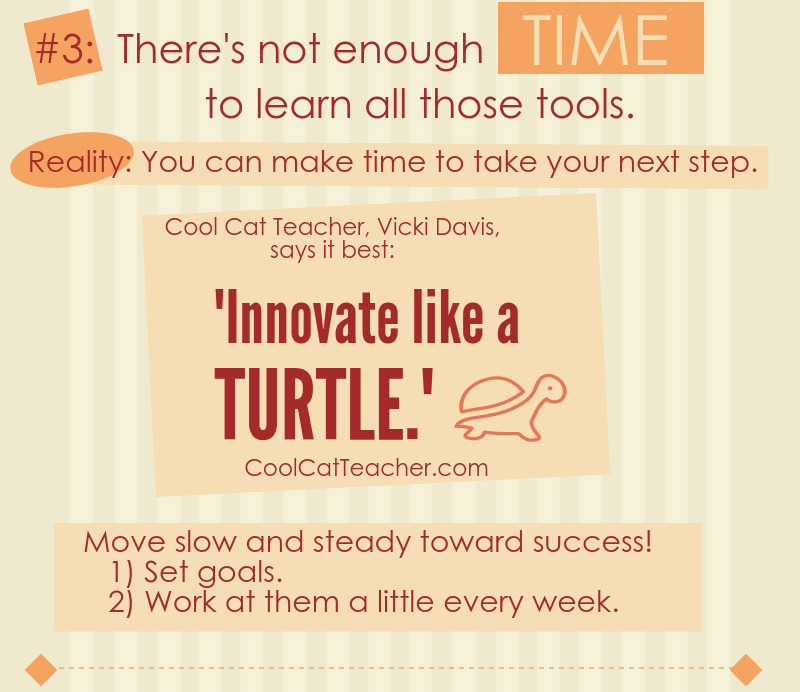
Myth #3:  There's not enough time to learn all those tools.


Reality:  You can make time to take your next step.

Innovation can sound intimidating, but often it boils down to identifying your next small step and taking it. We all have a next step, and for all of us that next step is a challenge. When it comes to modeling lifelong learning, though, do we really have a good excuse to not regularly take that step?

This slide is based on quote from Cool Cat Teacher, Vicki Davis. I love her blog and podcasts. She is a model of an innovative, lifelong learner.


Myth #4:  Tech takes too much time from my class.


Reality:  It doesn't have to.

All I can say in response to this myth is that I've seen teachers integrate technology in ways that didn't take up a lot of class time. Yes, sometimes it can take more than it should, but this slide lists some practical tips I've learned from working with many classes.

I also want to link to a couple blog posts about very simple tech projects. If you need a first step, these might be good starting points:

  • Infopics - Simple tools for adding text to pictures
  • Audio recordings using TwistedWave - This simple online audio recorder integrates with Google Drive and can result in a very quick project at the end of a lesson.


Myth #5:  Tech is important, but ________ is more important.


Reality:  Effective tech use will help accomplish more of what's most important.

Some will say this point is too idealistic. It's a simple fact, though, that a person who can effectively use the best tool for a job has an advantage over anyone who can't use that tool. I want that advantage for the students that I work with.

This final slide is based on my AMP Up What's Working activity. It's a great resource to get teachers thinking about the proper use of technology in their work.

When we get beyond the idea that tech just makes things easier and saves time, we can clearly see the advantages that it offers. We can more easily identify the best tool for accomplishing what matters most.


What other myths, misconceptions or excuses have you heard when it comes to incorporating more ed-tech? Are there some reality statements above that you still disagree with? I'd love to hear your thoughts in the comments or by email.

Sunday, March 20, 2016

Using Technology to Amplify What's Working

This post is about a resource I created for for teacher professional development sessions about tech integration. It serves at least three purposes:
  • It reinforces the idea that technology should be used for more than just saving time
  • It introduces teachers to good research-based instructional strategies.
  • It provides a common language and vision for effective use of technology.
It's based on the idea that technology amplifies. Like a lever can allow one person to lift more or a shovel can help one person dig more, technology in the classroom can increase the effectiveness of good instructional strategies.

A link to the document is below. As teachers work in pairs or a group of three to fill in the table, it requires them to go through this process:
  • Identify and describe a few good instructional strategies - I have been providing these, but teahers could start by sharing some they use or possibly researching them on their own. I like to direct them to John Hattie's work and this page is a good starting point.
  • Identify tech tools they have available that can amplify the practice - It helps to give an example here. I use lecture, since everyone is familiar with it, but it's not likely to be on the top of the list of effective practices. As an example of enhancing it with technology, we talk about how video can be used in powerful ways in flipped and blending learning models. It's important that specific tools are mentioned. For example, if the teachers use Chromebooks I'd suggest SnagIt as a great tool for recording the screen.
  • Identify (and possibly describe) the ways the technology gives an advantage - This is the heart of the activity. I call these ways "AMPs", which stands for Achieve Maximum Potential. Some example AMPs from my list that we could mention for amplifying the lecture would be:
    • Improves the access for learning - Students can watch it even if they're not in class.
    •  Personalizes the learning experience for the needs of the learner - They can play parts again or skip ahead as necessary.
I included 10 AMPs in the document, each labeled with a letter to make it easier to complete the table. A description of each, including examples, is on the second page.

Saturday, October 17, 2015

Teachers and Students Discover the Power of Technology for Learning

This is a combination of two posts from my Teaching Like an Artist blog. I'm doing a series there about topics related to our upcoming presentation at miGoogle 2015.

The first part is an interview between me and Jake. The second part shows the encouraging responses we received from a student survey. Both highlight how encouraging this activity was for us and the students.

The Interview
In preparation for our conference presentation, Jake Gentry, a Geometry teacher at the high school where I work, decided to try an inquiry based learning activity in his classes. We have worked together on a couple project-based learning activities in the past, but we both felt we weren't being "hands-off" enough in letting the students explore the concepts.

To see if inquiry-, discovery-based learning could really work, Jake went all in and had students explore and discover using technology instead of using any direct instruction.

In this recording (around 10 minutes long) I asked him some questions about what he did, what he learned and how effective he thought it was. They're still working through the project, so these are his thoughts so far.

The general outline of the talk is:
  • Why we did it
  • What the activity was like
  • What has he seen so far - is it working?
  • The level of thinking that was going on during the activity
  • What tech did the students use for learning?
  • What tech did he use to run the activity?
  • What effects has he seen on the students?
  • Was there support from the principal?
  • How the focus shifted from "Is this right?" to the learning goals


_________________________

The Survey
Next we gave the students a short survey to see what they thought about the experience. We received 86 responses and a few significant findings are reported below.

Overall, Jake and I were again encouraged by what we learned. This makes it even more likely he will continue exploring these teaching strategies in future lessons.

We first asked students to indicate how much they agreed or disagreed with this statement:

I prefer to learn by exploring on my own instead of just having the teacher explain material to us.

Here are the results, from Strongly Disagree to Strongly Agree:
I was surprised to see only about 15% of the students disagreeing. This was a great sign that the students were with us in this endeavor. I thanked them for trying this out and being such great sports about learning with us.

For many the seven class periods spent exploring a guiding question without much direction from the teacher was the first experience with such "hands off" learning in math. It was wonderful to see the students were this open to it.

After reading some comments from the students, I made it clear that our intent is not to replace teachers with computers. Obviously it helps to have an expert in education designing the learning experience, even if he or she is not delivering the material to the class in a traditional manner.
________

Results of this second question were most significant to me. Again, they were asked to rate how much they agreed or disagreed with this statement:

I can learn a tremendous amount on my own by exploring online tools such as search engines, videos and interactive websites.

Note first of all that this statement is not limited to Geometry or even math. It is simply a statement about being able to learn with online resources. 

Also, it's interesting to me that Jake and I debated about using the word "tremendous". I pushed to leave it, even though we knew it could make some students less likely to agree.

This is how they responded.


Jake gave me a high-five when we saw the graph after the first period. When the upper ratings remained high class after class, I was excited. I get chills when I talk about this stuff! To me, 4's and 5's on this graph (submitted by a full 73% of the students) means students are aware of the possibility before them to learn in amazing ways. 

Doors of opportunity opened to students who realized this through our lesson. In whatever areas they choose, they inched a step closer to success this past week.

We had a couple open ended questions on the survey and many students did say that through this activity they realized they could learn by exploring online resources. Some admitted they didn't think they could, but now they know otherwise. Some referred to gaining confidence by working through the lesson.

Jake and I know there's a lot we can do to improve the activity. Realistically students might be giving themselves way too much credit for what they actually learned. Still, this is the kind of thing that gets me out of bed in the morning. I love encouraging students to use the power of technology for learning. I look forward to seeing where it takes them.
_________________________

This is a combination of posts from a series on my conference session, The Way of the Google Drive. Be sure to follow me on Twitter or on either blog to keep up with the "thoughts and tools to inspire". 

Click here to see all the posts from that blog with the tag The Way of the Google Drive.