Showing posts with label purpose of technology. Show all posts

Sunday, May 15, 2016

5 Myths About Ed-Tech That Keep You (And Your Students) From Being Amazing

It might not look like it, but the infographic below is my story from the past few years as I worked with several teachers. In that time I regularly heard the same misconceptions from them as I encouraged more tech integration and creative projects in all classes.

I call these misconceptions and myths, but in reality they started to sound more like excuses. That's understandable. We all know change isn't pleasant.

But whether someone actually believes these myths and is looking for a way to innovate or if they've just used them as a reason to do business as usual, I'm countering each of myth with a few ideas that I know to be true.

I and the many teachers I work with are not perfect examples of innovative educators, but together we've seen that change is possible. We've seen that a technology project in a core subject can let students shine in exciting ways. We've realized that when it all doesn't go perfectly, it's not a bad thing to struggle and learn in front of the students.

So I put some of the things I learned into the infographic below. You can view the full image here.

I have each frame of it below along with thoughts, resources and links than I could include in the graphic.
__________________________

Myth #1:  Students are already good with tech.


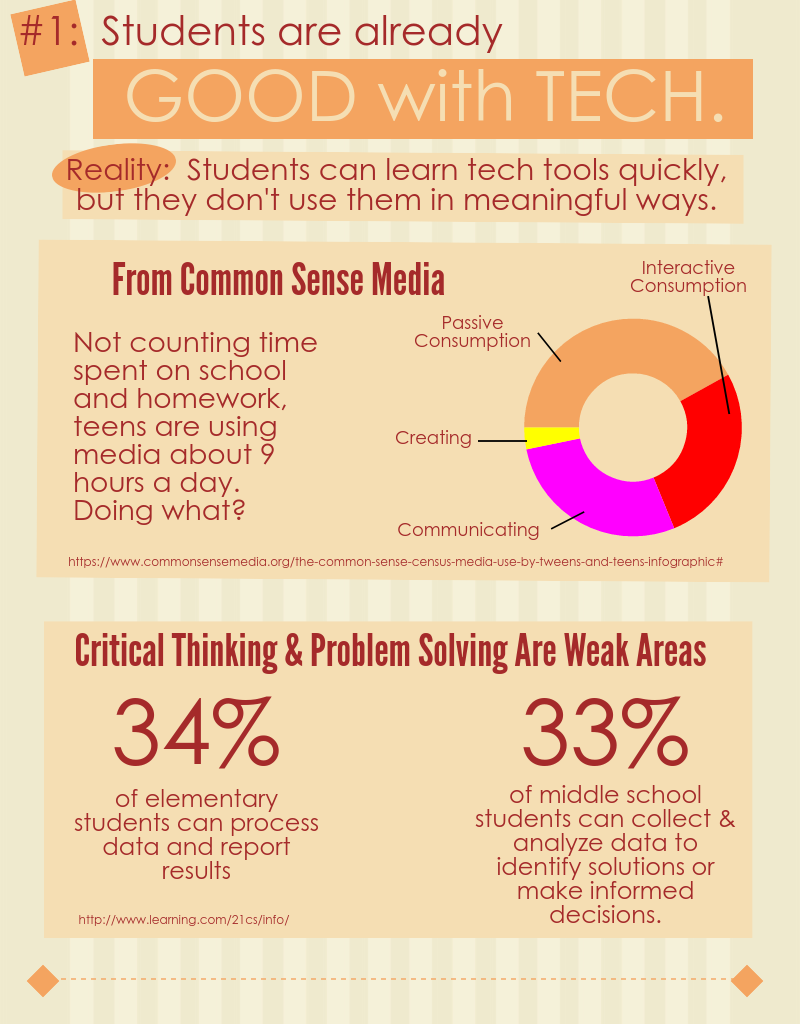
Reality:  Students learn tech tools quickly, but they don't use them in meaningful ways.

I've been impressed with how quickly students can learn to use new tools. Not intimidated by tech, they jump in and figure out how to make it do what they want almost immediately.

When it comes to doing something meaningful, though, they have a lot to learn. If we look for evidence of skills for success in today's world, such as writing a blog post someone would read or making a persuasive, watchable video, we can see there's a lot of room for learning.

I included a few stats in the infographic to support this. They're from these studies:


To illustrate how quickly students can learn new tools, this post and this one give examples of how I introduced students to iMovie. Many times it's just a matter of showing them what's possible first.

Myth #2:  We haven't had enough good professional development.


Reality:  You can take charge of your own PD.

I'm glad when I see some teachers discover they really don't need me. They realize a quick Google search or a video on YouTube can help them learn what they needed.

The main idea for this section of the infographic came out of an informal survey I sent out to my PLN (and some of them shared with their own). I wrote about it in detail in this post. The big take-aways are in this slide.

  • Over 70% of the respondents said they learn new tech tools on their own or from colleagues.
  • Only around 2% of them claimed that traditional styles of district provided PD helped them learn to use the tech tools they rely on in the classroom.
Now, it is my job to help teachers and I'm not trying to get out of that responsibility. My point is that we can't just stay where we're at, always waiting for that perfect PD session to give us what we need. Limited budgets and different needs makes it an unlikely scenario. Besides that, the vast majority of the people making a difference do not attribute their success to such an experience.


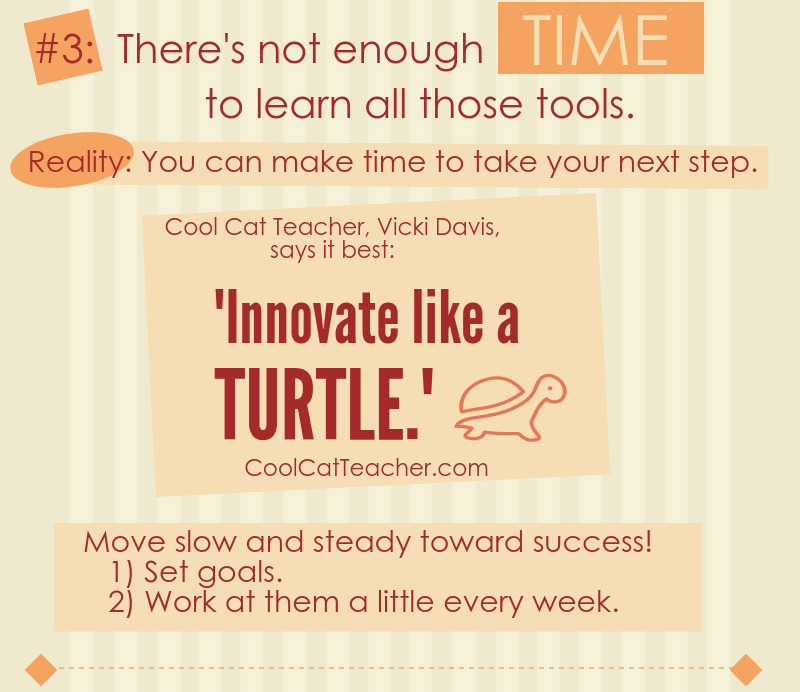
Myth #3:  There's not enough time to learn all those tools.


Reality:  You can make time to take your next step.

Innovation can sound intimidating, but often it boils down to identifying your next small step and taking it. We all have a next step, and for all of us that next step is a challenge. When it comes to modeling lifelong learning, though, do we really have a good excuse to not regularly take that step?

This slide is based on quote from Cool Cat Teacher, Vicki Davis. I love her blog and podcasts. She is a model of an innovative, lifelong learner.

Myth #4:  Tech takes too much time from my class.


Reality:  It doesn't have to.

All I can say in response to this myth is that I've seen teachers integrate technology in ways that didn't take up a lot of class time. Yes, sometimes it can take more than it should, but this slide lists some practical tips I've learned from working with many classes.

I also want to link to a couple blog posts about very simple tech projects. If you need a first step, these might be good starting points:

  • Infopics - Simple tools for adding text to pictures
  • Audio recordings using TwistedWave - This simple online audio recorder integrates with Google Drive and can result in a very quick project at the end of a lesson.


Myth #5:  Tech is important, but ________ is more important.


Reality:  Effective tech use will help accomplish more of what's most important.

Some will say this point is too idealistic. It's a simple fact, though, that a person who can effectively use the best tool for a job has an advantage over anyone who can't use that tool. I want that advantage for the students that I work with.

This final slide is based on my AMP Up What's Working activity. It's a great resource to get teachers thinking about the proper use of technology in their work.

When we get beyond the idea that tech just makes things easier and saves time, we can clearly see the advantages that it offers. We can more easily identify the best tool for accomplishing what matters most.


What other myths, misconceptions or excuses have you heard when it comes to incorporating more ed-tech? Are there some reality statements above that you still disagree with? I'd love to hear your thoughts in the comments or by email.

Sunday, March 20, 2016

Using Technology to Amplify What's Working

This post is about a resource I created for for teacher professional development sessions about tech integration. It serves at least three purposes:
  • It reinforces the idea that technology should be used for more than just saving time
  • It introduces teachers to good research-based instructional strategies.
  • It provides a common language and vision for effective use of technology.
It's based on the idea that technology amplifies. Like a lever can allow one person to lift more or a shovel can help one person dig more, technology in the classroom can increase the effectiveness of good instructional strategies.

A link to the document is below. As teachers work in pairs or a group of three to fill in the table, it requires them to go through this process:
  • Identify and describe a few good instructional strategies - I have been providing these, but teahers could start by sharing some they use or possibly researching them on their own. I like to direct them to John Hattie's work and this page is a good starting point.
  • Identify tech tools they have available that can amplify the practice - It helps to give an example here. I use lecture, since everyone is familiar with it, but it's not likely to be on the top of the list of effective practices. As an example of enhancing it with technology, we talk about how video can be used in powerful ways in flipped and blending learning models. It's important that specific tools are mentioned. For example, if the teachers use Chromebooks I'd suggest SnagIt as a great tool for recording the screen.
  • Identify (and possibly describe) the ways the technology gives an advantage - This is the heart of the activity. I call these ways "AMPs", which stands for Achieve Maximum Potential. Some example AMPs from my list that we could mention for amplifying the lecture would be:
    • Improves the access for learning - Students can watch it even if they're not in class.
    •  Personalizes the learning experience for the needs of the learner - They can play parts again or skip ahead as necessary.
I included 10 AMPs in the document, each labeled with a letter to make it easier to complete the table. A description of each, including examples, is on the second page.

Saturday, October 17, 2015

Teachers and Students Discover the Power of Technology for Learning

This is a combination of two posts from my Teaching Like an Artist blog. I'm doing a series there about topics related to our upcoming presentation at miGoogle 2015.

The first part is an interview between me and Jake. The second part shows the encouraging responses we received from a student survey. Both highlight how encouraging this activity was for us and the students.

The Interview
In preparation for our conference presentation, Jake Gentry, a Geometry teacher at the high school where I work, decided to try an inquiry based learning activity in his classes. We have worked together on a couple project-based learning activities in the past, but we both felt we weren't being "hands-off" enough in letting the students explore the concepts.

To see if inquiry-, discovery-based learning could really work, Jake went all in and had students explore and discover using technology instead of using any direct instruction.

In this recording (around 10 minutes long) I asked him some questions about what he did, what he learned and how effective he thought it was. They're still working through the project, so these are his thoughts so far.

The general outline of the talk is:
  • Why we did it
  • What the activity was like
  • What has he seen so far - is it working?
  • The level of thinking that was going on during the activity
  • What tech did the students use for learning?
  • What tech did he use to run the activity?
  • What effects has he seen on the students?
  • Was there support from the principal?
  • How the focus shifted from "Is this right?" to the learning goals


_________________________

The Survey
Next we gave the students a short survey to see what they thought about the experience. We received 86 responses and a few significant findings are reported below.

Overall, Jake and I were again encouraged by what we learned. This makes it even more likely he will continue exploring these teaching strategies in future lessons.

We first asked students to indicate how much they agreed or disagreed with this statement:

I prefer to learn by exploring on my own instead of just having the teacher explain material to us.

Here are the results, from Strongly Disagree to Strongly Agree:
I was surprised to see only about 15% of the students disagreeing. This was a great sign that the students were with us in this endeavor. I thanked them for trying this out and being such great sports about learning with us.

For many the seven class periods spent exploring a guiding question without much direction from the teacher was the first experience with such "hands off" learning in math. It was wonderful to see the students were this open to it.

After reading some comments from the students, I made it clear that our intent is not to replace teachers with computers. Obviously it helps to have an expert in education designing the learning experience, even if he or she is not delivering the material to the class in a traditional manner.
________

Results of this second question were most significant to me. Again, they were asked to rate how much they agreed or disagreed with this statement:

I can learn a tremendous amount on my own by exploring online tools such as search engines, videos and interactive websites.

Note first of all that this statement is not limited to Geometry or even math. It is simply a statement about being able to learn with online resources. 

Also, it's interesting to me that Jake and I debated about using the word "tremendous". I pushed to leave it, even though we knew it could make some students less likely to agree.

This is how they responded.


Jake gave me a high-five when we saw the graph after the first period. When the upper ratings remained high class after class, I was excited. I get chills when I talk about this stuff! To me, 4's and 5's on this graph (submitted by a full 73% of the students) means students are aware of the possibility before them to learn in amazing ways. 

Doors of opportunity opened to students who realized this through our lesson. In whatever areas they choose, they inched a step closer to success this past week.

We had a couple open ended questions on the survey and many students did say that through this activity they realized they could learn by exploring online resources. Some admitted they didn't think they could, but now they know otherwise. Some referred to gaining confidence by working through the lesson.

Jake and I know there's a lot we can do to improve the activity. Realistically students might be giving themselves way too much credit for what they actually learned. Still, this is the kind of thing that gets me out of bed in the morning. I love encouraging students to use the power of technology for learning. I look forward to seeing where it takes them.
_________________________

This is a combination of posts from a series on my conference session, The Way of the Google Drive. Be sure to follow me on Twitter or on either blog to keep up with the "thoughts and tools to inspire". 

Click here to see all the posts from that blog with the tag The Way of the Google Drive.

Friday, July 11, 2014

How to Be Good with Tech - Part 1

Photo from Kevin Jarrett from Flickr -
https://www.flickr.com/photos/kjarrett/
I’ve been working with computers for over 30 years. I have also worked with teachers and students as an instructional tech coordinator for the past six years. Helping them use more technology (and working with some who resist) has driven home one point time and time again:

Being “good with tech” is largely a way of thinking.

There’s no magic involved. I'd even argue there aren't hours of training sessions involved. Instead there are mindsets and resulting practices that make it easier for some to pick up the new tools. In other words, these are things anyone can learn and improved tech skills will be the result.

So in this series I will point out a few myths the tech challenged believe that hold them back. I’ll also explain some approaches the rest of us use that give us an advantage in keeping up with the never-ending stream of new.

Since I work in education, I’m often thinking of the teachers and students I encounter there, struggling or resisting to use more technology for learning or sharing ideas. Beyond that, though, I’m writing to anyone who finds digital tools to be an obstacle, but knows the tools can help them accomplish more of what they want to.

If you read through this article and, at any point, can't accept what I'm saying, please leave me a comment or send me an email. I hope to use any feedback to improve this series.

And for now, I will start by tackling the biggest myth of all:

Myth #1: Technology is hard to learn.

I start with this myth because:
  • For as often as I hear it and the thoughts resulting from it, I don’t believe it for a second.
  • Believing it leads directly to some of the other inaccurate thinking I’ll address later in the series.
When a new tool comes along, maybe you fall victim to a very real fear because of this myth. It’s hard to learn and no one wants to look dumb, right?

And of course many have discovered this view of technology makes an easy excuse to avoid the necessary work of learning or using something new. A good share of the population heartily agrees that computers and all those gadgets take more effort to learn than they’re worth. Point out just one instance when time was lost, more problems arose or someone was frustrated by a new tool and nearly everyone in the room agrees: There’s no time for learning that complicated stuff. Back to the old way!

Regardless of why you’ve held to this notion, until you get past the false perception of how hard it is to use technology, you’ll always see yourself in the ungifted group. You’ll keep waiting for some convenient time when you have days to learn and nothing else to do. In other words, you’ll never start.

I hope by the end of this article you'll be open to this simple fact: Learning to use technology effectively is not as hard as you think.

A simple first step

So let’s start with an exercise. Next time you’re amazed when you see a person (maybe even a child) do something impressive with a new tech tool, don’t immediately attribute it to a gift you'll never possess. Instead, be open to the possibility that digital tools are simpler than they used to be.

I feel like I’m giving away a secret here. I like to appear really smart when I help teachers with new programs. I love it when I’m the hero that bailed out the teacher in front of the whole class. (Early elementary students will break into applause for these feats. It feels amazing.)

But I’m just trying to be honest. Instead of new tools confounding me now and then, I am regularly amazed at how much simpler they are.

Yes, I remember how long it took me to hook up a new printer or connect to a new internet service years ago. New software was hard to configure, and that was if I managed to install it correctly.

I understand that many adults of a certain age had years of those experiences (or maybe, years of witnessing others going nuts with those experiences). This formed the idea that technology is hard to use. 

Now, relatively speaking, that’s simply not true.

Photo from Brad Flickinger on Flickr -
https://www.flickr.com/photos/56155476@N08/
Think about this for a minute. I mean no disrespect to your kids or grand kids, but isn’t it possible that all those young people who quickly learn to work the new gadgets simply don’t hold this myth in their minds? They come at the new stuff thinking it’s meant to be intuitive and work effectively. They act accordingly and success is the result.

Technology is wildly popular and used throughout our society now not because the younger generation is so much smarter. It's largely because the tools are easier to use. Nowadays if a new tool is hard to use, you’ll never see it survive the market long enough to reach the masses.

But what about...

Before you hit me up with recent horror stories of incompatible software destroying your meeting or network failures that brought the office to a standstill, please keep a few things in mind.

First, I’m talking about technology that’s working as intended. Realistically speaking, that happens the vast majority of the time. Organizations dealing in a day with hundreds of times more money than you and I make in a decade trust their fortunes to this fact. It doesn't let them down in any significant way.

I’m also talking about average use. The amazing wizardry we see from people who live in front of their computers, have budgets for the what’s beyond the cutting edge and who work in specialized fields is difficult to replicate. That's why they are paid good money to do it.

But I’m taking about common tools that allow normal people to achieve more than they do without them. And that's an important goal I'm glad to help people move toward.

And if you’re still doubtful, I’m not saying the skills are so simple that no brains or effort is required. My later articles in this series will address what and how much is required to become competent.

Examples of positive change

To get specific, here are a few ways I regularly notice the tools have become easier over the years:
  • Language in the apps is far less technical than it used to be. Menus, buttons and even error messages use common words instead of all the specialized terminology we used to see.
  • Help features of programs are written better and many are making excellent use of video to explain exactly what you need to know. I’m very impressed with the quality of virtual training involved in much of the new software I encounter.
  • Apps only do a few things, so options are limited. It used to be software companies boasted of all the things their programs could do. I guess the goal was to make tools like Word, Publisher or PowerPoint so flexible they could be used to turn out many different types of content. That made software complicated, with features buried in menus requiring many steps. Now apps are specialized. You find out what you need to do, look up the best app for it and it does just that with a few taps.
  • There is more consistency across tools. Yes, we still have the PC versus Mac and iOS versus Android divides, but overall similar icons and terms appear across many common programs. Once you realize this, it won’t look so mystical when your teen figures out your new iPad app within seconds of opening it. 
  • If common problems and questions weren’t addressed in the Help features of the software, they are only a web search away. Anyone who works regularly with technology will tell you the power of a simple Google search when it comes to using a tricky feature of a new program.
  • You can hook up most new hardware by plugging in a cable. Sometimes you have to download a driver first, but do I even have to give examples of how difficult this used to be? I am continually grateful for these improvements.
_________

I’m not expecting now that you'll sit at a computer and churn out an amazingly easy, yet visually stunning video to upload to YouTube. I’m just hoping when the next person bails you out a tech bind you won’t immediately attribute success to his or her mad skills. Instead, think...

Maybe the tools are easier now. Maybe I could learn to do that too.

Try thinking that way for a few days. Once you’re open to that possibility, you’ll be ready to take the steps I’ll address in part 2.

Sunday, October 21, 2012

For the First Time - Starting something new with the power of technology

I was inspired when I read Seth Godin's book Poke the Box last summer.  This past week I assigned a journal project to the high school students in a Digital Media class that I work with.

I encouraged them to reflect on some things they did for the first time in 2012.  Going beyond just the message of the book, I also asked them to evaluate the items on their list of "first times".  The assignment then ended with some goal setting.

To tie this into technology, I firmly believe the tools that allow us to connect with others nearby and around the world require us to start big things that make a positive difference in the lives of others.

A high school technology course should not be about the technology, but how the technology can help the students achieve their potential. 

If you're interested in the presentation and assignment:

First I spoke to the class about the book and some examples from my own life.  Here is a recording of that talk that I made later.  It's about 4.5 minutes long.


Then I showed them the video about Caine's Arcade.  This a great example of people starting something new.  I make sure students consider the action of the filmmaker in this story.  He is really the one who "poked the box" by seizing an opportunity that grew into something powerful.  Students can appreciate something that gets over three million views on YouTube and results in a scholarship for a young boy.


And finally, here's the journal assignment that I gave to the students.  I was very pleased with the response the class gave to the presentation, the video and the journal assignment.

Wednesday, January 18, 2012

My Mantras

Here are some things I find myself repeating when I work with students in all grade levels. It's not always with these exact words, but these quotes are the foundation of my work in the schools.

  • Anyone can play with technology, but successful people use it to create something valuable.
  • Technology is a magnifier. It always allows the user to do more. What more has technology allowed you to do? What more would you like to do with it?
  • Technology makes many things simpler, but the best jobs still go to the people who can do the difficult things.