Showing posts with label how to be good with tech. Show all posts

Sunday, May 15, 2016

5 Myths About Ed-Tech That Keep You (And Your Students) From Being Amazing

It might not look like it, but the infographic below is my story from the past few years as I worked with several teachers. In that time I regularly heard the same misconceptions from them as I encouraged more tech integration and creative projects in all classes.

I call these misconceptions and myths, but in reality they started to sound more like excuses. That's understandable. We all know change isn't pleasant.

But whether someone actually believes these myths and is looking for a way to innovate or if they've just used them as a reason to do business as usual, I'm countering each of myth with a few ideas that I know to be true.

I and the many teachers I work with are not perfect examples of innovative educators, but together we've seen that change is possible. We've seen that a technology project in a core subject can let students shine in exciting ways. We've realized that when it all doesn't go perfectly, it's not a bad thing to struggle and learn in front of the students.

So I put some of the things I learned into the infographic below. You can view the full image here.

I have each frame of it below along with thoughts, resources and links than I could include in the graphic.
__________________________

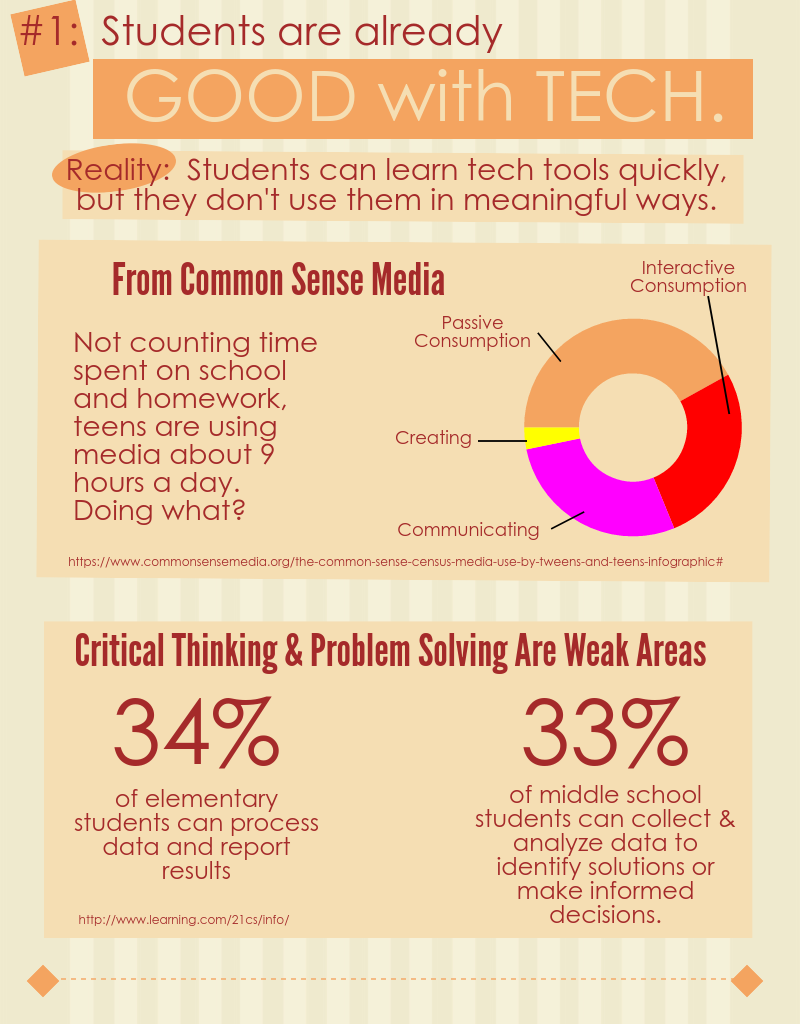
Myth #1:  Students are already good with tech.


Reality:  Students learn tech tools quickly, but they don't use them in meaningful ways.

I've been impressed with how quickly students can learn to use new tools. Not intimidated by tech, they jump in and figure out how to make it do what they want almost immediately.

When it comes to doing something meaningful, though, they have a lot to learn. If we look for evidence of skills for success in today's world, such as writing a blog post someone would read or making a persuasive, watchable video, we can see there's a lot of room for learning.

I included a few stats in the infographic to support this. They're from these studies:


To illustrate how quickly students can learn new tools, this post and this one give examples of how I introduced students to iMovie. Many times it's just a matter of showing them what's possible first.


Myth #2:  We haven't had enough good professional development.


Reality:  You can take charge of your own PD.

I'm glad when I see some teachers discover they really don't need me. They realize a quick Google search or a video on YouTube can help them learn what they needed.

The main idea for this section of the infographic came out of an informal survey I sent out to my PLN (and some of them shared with their own). I wrote about it in detail in this post. The big take-aways are in this slide.

  • Over 70% of the respondents said they learn new tech tools on their own or from colleagues.
  • Only around 2% of them claimed that traditional styles of district provided PD helped them learn to use the tech tools they rely on in the classroom.
Now, it is my job to help teachers and I'm not trying to get out of that responsibility. My point is that we can't just stay where we're at, always waiting for that perfect PD session to give us what we need. Limited budgets and different needs makes it an unlikely scenario. Besides that, the vast majority of the people making a difference do not attribute their success to such an experience.


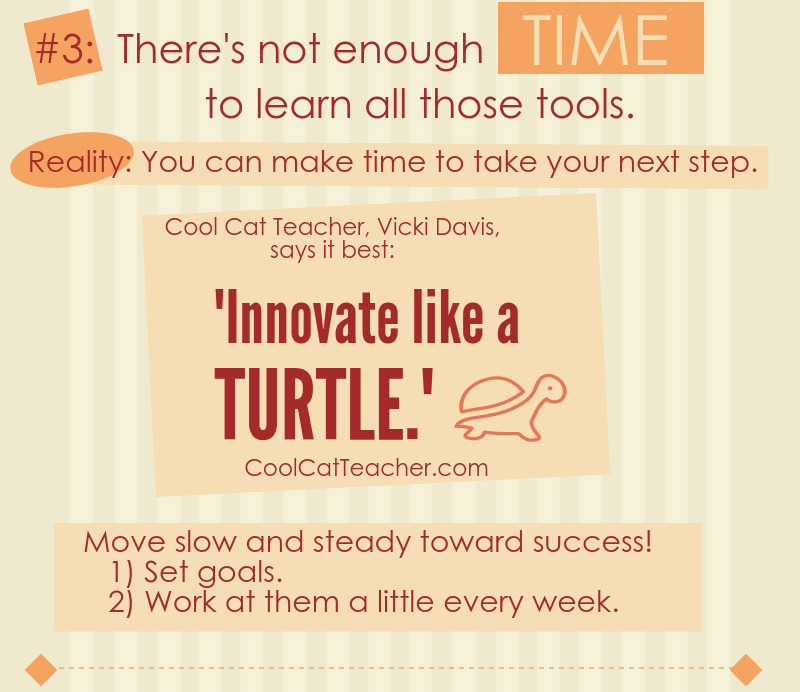
Myth #3:  There's not enough time to learn all those tools.


Reality:  You can make time to take your next step.

Innovation can sound intimidating, but often it boils down to identifying your next small step and taking it. We all have a next step, and for all of us that next step is a challenge. When it comes to modeling lifelong learning, though, do we really have a good excuse to not regularly take that step?

This slide is based on quote from Cool Cat Teacher, Vicki Davis. I love her blog and podcasts. She is a model of an innovative, lifelong learner.


Myth #4:  Tech takes too much time from my class.


Reality:  It doesn't have to.

All I can say in response to this myth is that I've seen teachers integrate technology in ways that didn't take up a lot of class time. Yes, sometimes it can take more than it should, but this slide lists some practical tips I've learned from working with many classes.

I also want to link to a couple blog posts about very simple tech projects. If you need a first step, these might be good starting points:

  • Infopics - Simple tools for adding text to pictures
  • Audio recordings using TwistedWave - This simple online audio recorder integrates with Google Drive and can result in a very quick project at the end of a lesson.


Myth #5:  Tech is important, but ________ is more important.


Reality:  Effective tech use will help accomplish more of what's most important.

Some will say this point is too idealistic. It's a simple fact, though, that a person who can effectively use the best tool for a job has an advantage over anyone who can't use that tool. I want that advantage for the students that I work with.

This final slide is based on my AMP Up What's Working activity. It's a great resource to get teachers thinking about the proper use of technology in their work.

When we get beyond the idea that tech just makes things easier and saves time, we can clearly see the advantages that it offers. We can more easily identify the best tool for accomplishing what matters most.


What other myths, misconceptions or excuses have you heard when it comes to incorporating more ed-tech? Are there some reality statements above that you still disagree with? I'd love to hear your thoughts in the comments or by email.

Sunday, June 28, 2015

Basic Chromebooks Tips for Teachers

I've been using Chromebooks myself for a couple years, but our middle school is just received the first few classroom sets this summer. I created these two documents with helpful Chromebook tips for the teachers and I wanted to share them here.

Some of the information is specific to our district, but you can easily make a copy of these and edit them as necessary. I'd appreciate it if you include a link to this blog on any copies distribute.

The first tipsheet is about file management. Among other tips, it refers to the Save to Google Drive extension, which is installed on all of our Chromebooks.

File Management With a Chromebook

And the second tipsheet is about ways to capture the screen, including how I mark up my screen captures.

Screen Captures on a Chromebook

You might also want to see:

Thursday, August 21, 2014

How to Be Good with Tech - Part 5

I've been writing this series for a few weeks now and I'm winding it down with three short posts, this being the first. If you want to review what I've written so far...

My previous article (Part 4) was the most practical, suggesting the tip "Move ahead fearlessly". In it, I even went so far to assign a 30 minute activity that anyone could start with.

Prior to that, in Part 1 and Part 3 I addressed some common myths that hold people back. In Part 2 I pointed out that successful people think "big picture" when they use technology, not step by step.

This time, I have this advice:

Tip #6:  Move ahead regularly.

Of course, this goes along with what I wrote in Part 4. To get good with tech tools you have to start practicing and keep practicing. 

When I work with people who struggle with technology, I see time after time that they simply have not developed enough experience with tools in general. When the slightest problem crops up, they have no prior knowledge to rely on. Every tool and every task is new.

In other words, what you start with isn't even that important. As long as you can make some progress with it, you'll begin to form the confidence, conceptual frameworks and problem solving skills that can be applied to other tools you'll need.

Many hesitant learners tell me they are waiting for a trainer to provide direction or an employer to provide time, but my point here is you need to make the time yourself.

I want to share some results of a survey I sent out to educators through Twitter and Edmodo. I was hoping to get data to share with teachers at the start of the school year. I realized that it applied here too. In the end, I had 63 responses. Obviously it's not the definitive study in these matters, but I think it offers some weight to what I'm saying here.

First, I asked respondents to rank themselves on a scale from one (reluctant) to five (innovative) when it comes to tech use in their job in education. A choice of three represented "average in their district". Here were the results:

Then I asked about the quality of professional development or training that they receive on the new tools they use. From "exceptional" down to "we don't receive any", here were the results:


Note that over half the respondents either are not trained or they consider the training to be inadequate. But almost all of them are above average when it comes to tech use?

Well, finally I asked them to choose which of these options that best represents how they learn the new tools:

  • From professional development that is provided to them.
  • From professional development plus time spent on their own.
  • From colleagues and time spent on their own.
  • From time spent on their own.
As you might have guessed based on my tip above, the vast majority (over 70%) of these people are not relying on training to use new tools in their work. They're moving ahead with some help from others and time on their own. Here are the results.


Take the informal survey for what it's worth. It at least shows training is not a prerequisite for moving ahead with technology.

Instead of getting formal training, my recommendation is to plan time regularly to just explore a tech tool. Maybe it will be 30 - 60 minutes on a Saturday morning. Maybe you'll make time every night for a month.

Whatever you decide, just like exercise or learning to play an instrument, regular practice will quickly pay off with noticeable results.

Up next, one tip that gives me an edge when I have to work with digital tools.

Friday, August 8, 2014

How to Be Good with Tech - Part 4

I've been posting some articles the past several weeks about how success with technology is not just about talent and experience.

Being good with tech is primarily a way of thinking.

In Part 1 and Part 3 I addressed some common myths that hold people back. In Part 2 I pointed out that successful people think "big picture" when they use technology, not step by step.

Now I want to get practical. Let’s look at the best advice I know and a few tips that will help you take it.

Tip #2: Move ahead fearlessly.

About a year after I started my job as an instructional tech coordinator I was helping a teacher learn to use a SmartBoard and student response system. She wanted to show the students an online quiz, gather answers from them and work out the problems on the board.

I spent her lunch period setting it up, then she came in the room with only a short time left before students returned. I showed her the basics of controlling the computer through the board.  I was not an expert on the equipment myself, so we ran into some glitches. I was running a demo and a test at the same time and it was going as poorly as you might expect.

As students were entering the room, I felt I hadn't given her much to work with. I probably had even made it look harder than it was. I told her I could come back later that day or early the next to figure it out. She surprised me by saying she would give it a try as soon as the students were all seated and ready to begin.

That was the first time I realized courage to move forward in the face of uncertainty beats any of the reasons to wait for preparation. After several more years of teaching people to use technology, I’ve seen this over and over...

Getting started makes all the difference. 

Imagine a spectrum where, on one end are those who avoid technology no matter what opportunities lie before them. On the other end are the people who will use it no matter what obstacles are in their way. Almost everyone will be at some point in between, but what matters most for success is which end you’re closest to.

Getting started trumps talent. Don’t think “good at tech” and “bad at tech”, as if those lead to effective use. Think “get started right now” versus “wait until ________”. Skill and knowledge follow getting started, not the other way around.

Getting started at the right time (i.e., as soon as you’re done reading this) makes everything else easier. All those misunderstandings about how hard or easy the tools are? Experience will make them disappear. Developing that big picture thinking? Start exploring on your own and you’ll see it forming in your mind.

On the other hand, have you felt the frustration of trying to get started too late? When the pressure is on, but you haven’t worked through the tipsheet since that training several months ago? Is it really a surprise that the encounter with tech ends in frustration?

Comfortably uncomfortable

The people I talk to who move ahead with new tools right away are not doing it because they’re comfortable, at least not in the ways we might think. The most innovative teachers I work with don’t have all the answers and all the bases covered in the first moment of truth. Being prepared to that level would take forever. When they jump in, they are simply comfortable with being uncomfortable.

It might look like they’re calm and collected, but they’re not resting in the familiar. They don’t know everything is going to work or exactly what they’ll do if it doesn’t. Instead of confidence in what they know, they have a confidence that they can figure it out.

It’s a step back from knowledge on the surface or all the emergency tools within reach. It’s being at ease with adapting and learning quickly, even if it’s in the heat of the moment.

This is a change in thinking, but you can start moving in that direction immediately.

Obstacles to get past

You might still see some looming obstacles keeping you from the first step.

If you’re afraid you’ll mess something up, start with something simple and small. I have my favorite example for easy exploration at the end of this article.

And remember what I said before about the tech being easier now. It’s very unlikely you’ll do serious damage when using a tool as intended. Deleted files can be recovered, crashed programs restarted and the physical equipment itself is built to take a few blows.

If you’re afraid of failing in front of others, practice will lessen this. Also (unless we’re talking tech for brain surgery) fail a few times (or have the tech fail) even when it matters. You’ll see life goes on. The times it does work will be well worth the experience in comparison to those minor setbacks.

Encouragement to move forward

If you still need encouragement, keep in mind...

Flexibility is a good thing. It is an essential skill in our quickly shifting world. Think about all the benefits to being able to deal with change. Obviously it makes for less anxiety, but think about the positive side. Being able to adapt to the unexpected will help you feel better about the situation and yourself. It’s a great relief for me to feel competent with new technology when I’m with people who are twenty or more years younger than me.

And beyond self-image, I’ve seen firsthand how important it is for others to view you as flexible. I work with administrators who oversee adults. I know how teachers view students. Whether we like it or not, flexible people are valued over inflexible. When you’re perceived as flexible and capable of learning it opens up more opportunities for you for growth and success.

I’m sure genetics and personal experience factor into our level of flexibility in new situations, but if it’s a skill, it can be developed. That won’t happen if you don’t start practicing the right thinking and the right actions.

Remember the overall goal. As I stated in my previous article, the goal of technology is not to make things simpler, but to accomplish more amazing things. The quality and quantity of your best work will improve and that’s exciting. Let the promise of accomplishing impressive things overshadow the discomfort of taking on a new tool. The clumsy first steps, the new tools you have to use but don’t care about, those are all just practice for eventually doing something big.

How successful people move ahead fearlessly

Tip #3: Know how to get back. 
Find Undo and locate the Home button. Save frequently or be sure the program automatically saves. We all make mistakes when we’re learning, but if you can get back to familiar state (even if that means rebooting the device) you can explore freely.

Tip #4: Trust the programmers.
When you forge ahead, trust that the people who set up the program did it with some logic. Trust you’ll be able to figure it out. I see some people struggle with new tools because they perceive the first error message or unexpected result as something wrong. It’s that stupid technology or that confusing computer stuff again. On the other hand, those who pick it up quickly will try to understand what caused the “problem”. They know there’s a logic behind it. There’s something to learn and they know they’ll be able to learn it given some time and effort.

Tip #5: Start with something that doesn’t matter. 
The quick studies do this a lot. When the trainer is telling everyone else where to click, the self-starters are zipping through menus and trying out buttons as they make a sample whatever. It almost certainly isn't something they'd use later. They’re not worried about doing it right. They don't feel they're wasting time. They just want to see how everything works. Try it. You might be surprised that you can do all that and still catch it when the trainer points out the real important stuff.* Better yet, do it before anyone even offers the training.

Your first assignment

So as an example of doing something relatively simple that doesn’t matter, I suggest playing around with Pixlr Express to edit a photo.

It’s a great application for fledgling explorers because it’s intuitive. It works on computers, iPads or Android devices. It has useful tools for cleaning up an image, but it's also filled iwth fun tools for adding effects and text. Just in case anyone has already used it, there’s always more to explore, better images to create and different devices to use it on.

So take 30 minutes right now to edit a photo with Pixlr Express. Use it to make something that didn't exist before. For extra credit, stick your results on Facebook when you’re done and tell everyone you wanted to do something new.

I’m not going to link to the site or tell you where to find the app. Just start with Google if you can’t find any other way. I’m resisting my teacher urge to give you a step by step** on getting a picture or importing it into the app. I'm not even putting an example here of a final result.

Your 30 minutes starts at whichever point you need to begin learning. Find the tool and do something with it.

Every minute is an investment for your future success.

Now, GO!

*If you do mess something up or you have to ask the person next to you what the trainer just said, so what? As long as it’s a rare occurrence, laugh it off. Have your impressive experiment on the screen when attention is drawn to you. Say something like, “I learn best by exploring on my own.” Maybe you’ll be an example to those around you.

**OK, I couldn't resist. If after five minutes you are still hopelessly lost, you can watch this short tutorial I made for the teachers and students in my district. Just don't count the tutorial time in your 30 minutes and be sure to do more than what I show there!

Monday, July 21, 2014

How to Be Good with Tech - Part 2

This is the second in a series of articles. If you haven't read the first one yet, it will be best to start there.

Helping teachers and students to use more technology (and working with some who resist) has driven home one point time and time again:

Being “good with tech” is largely a way of thinking.

There’s no magic involved. I'd even argue there aren't hours of training sessions involved. Instead there are mindsets and resulting practices that make it easier for some to pick up the new tools. In other words, these are things anyone can learn and improved tech skills will be the result.

So in this series I will point out a few myths the tech challenged believe that hold them back. I’ll also offer tips and strategies the rest of us use that give us an advantage in keeping up with the never-ending stream of new.

If you read through this article and, at any point, can't accept what I'm saying, please leave me a comment or send me an email. I hope to use any feedback to improve this series.

__________________

This time around I want to expose what I see as the get-rich-quick lie of learning technology. It’s a promise to those struggling the most that the job will be easier than it is. Instead of leading to success, it provides a false security and even hinders real progress..

If you've struggled with computers for years, you've most likely fallen into this misleading approach. You’ll probably think I’m making too much out of nothing. I urge you to keep an open mind as you read this, though, and try to see my point.

Instead of phrasing this as a myth to avoid, I’ll be positive:

Tip #1: When approaching a new tool or task, try to think “big picture”, not step by step.

There is a temptation to think knowing more steps will lead to success with technology tools. While it might help in the short term, I never see it lead to deeper, effective learning.

This is not just in the domain of technology. I saw it first when I tried to teach math. Struggling students would take pages of notes filled with lists of steps. They’d follow them faithfully to finish homework. Then they’d try without success to remember them all on the tests.

Now when I train teachers, those who are less comfortable with technology often ask for steps in tipsheets. They want training sessions where we go click by click through a new tool. When they realize I don’t usually start that way, they frantically write down notes thinking it will help later. When I do send a tipsheet out for some essential process, they file it away for when they need it. It's as if getting all the steps is the goal.

It’s easy to see why. Following steps can give a sense of accomplishment. The task at hand often does get done. There’s also comfort in knowing the list is nearby when needed.

The problem is I’ve never seen these teachers reach a level of competency with technology in general. Those people are the first to call when a problem arises. Regardless of how many times I explain the solution or how to work things out themselves, it never seems to stick.

When I start teaching and they start writing steps, I know right away I'll be back soon when they are stuck.

On the other hand, the students I work with in class or the teachers doing the most with technology adjust quickly to new tools. They almost never ask for step by step directions.

Preferring the steps is not a learning style. It’s a shortsighted approach that actually keeps the learner from ever seeing the necessary big picture.

Maps are better than lists

I recently had to find a friend at the University of Michigan. I haven’t driven those winding, busy streets in several years and I never really knew the layout of the campus. I don’t use a GPS, but I did grab a screenshot of the directions from my map app. I also took one of the map showing the general area.

When I neared the exit from the expressway I looked over the directions again. As soon as I got on the roads of the campus traffic was bad and I missed a turn within minutes. The name of one of the roads I was on changed at one intersection and I wasn’t sure if I was still on track. When I stopped at lights I quickly looked through the steps and scanned the scene for road signs to determine where I was in the list.

When I finally had a minute to gather my thoughts, I brought up that map instead. With just a quick glance I got my bearings straight. I knew the direction I was heading and the general direction of my destination. I knew immediately that even if I missed the next road I could take other side roads to get to the right building. I was even able to take in more of the surroundings, which will undoubtedly help the next time I have to visit.

I can’t emphasize this enough. When it comes to competency, the big picture perspective is essential to the learning process. Waiting for someone to tell you the steps and relying on lists for procedures will never be sufficient. Obstacles, problems and changes (which steps can never fully account for) will always lead to frustration in the times you most need to get where you’re going.

The best way to see that there is a real, significant difference between these two types of thinking is to ask a question to someone who is competent in any domain. Ask about directions to a location is in an area the person is familiar with. Ask a tech person to tell you the steps for some process. The first thing you’ll notice is they will have to translate from how they think about the task to steps. They never rattle off each turn or each click as if they’ve memorized them.

The thinking that leads to success comes from relationships in our mind between ideas, tools and experiences. They are connected in multiple ways like rooms in a building or locations across a landscape.  The mental organization necessary is too complex to be contained in lists of steps. A map is a better way to imagine what’s going on in the heads of those who successfully navigate from problem to solution.

A couple clarifications

To be clear, I’m not saying steps are useless. I still look up those “click here, then press this key” lists now and then. Those are best for the first time you have to use a tool to get something done. They’re handy for important tasks you only complete once in a while with tools that aren’t used otherwise. There will always be those tools you really don’t have to master and steps are good reminders.

Also, I am not offering any practical advice here on how to see the big picture. There are some things we can do to form those essential mental maps. My goal for now is only to relentlessly call out this important distinction and to point to a better way for success.

Where are we going?

I keep referring to success with tech tools, but let’s get more specific. This goes beyond just doing routine tasks. It also includes:

  • Learning new tools quickly
  • Applying the tools to new situations
  • Communicating effectively to a variety of audiences through the tools
  • Finding a solution when something goes wrong
  • Using the tools in new ways to create things that didn’t exist before

These skills make up what we call technology literacy. At that level, people are thinking with and through the tools. That level of understanding is required for problem solving and meeting specific needs with the tools at hand. Achieving such a high level of comprehension requires a higher level approach.

If thinking in steps is like getting only where the roads and sidewalks already exist, technology literacy is like finding a new path to a new place no one has visited. Imagine how that’s easier with a rugged mountain bike compared to someone who wants to keep their training wheels on. After a while, wanting the training wheels on is probably what’s making it harder.

True literacy and expression through the tools requires a deeper understanding of what they can do. More than just how, it also grasps the why behind the various tools and elements of a problem or task. Meaning is significant in the process.

Imagine learning to write by simply copying down words void of their meaning. I could probably get a good student who doesn’t speak English to copy all the words of this paragraph. In the end, every time he does it, all he could ever say would be what this paragraph says.

Being literate with tech tools goes beyond forming letters and then words. It’s using those letters and words to write the sentences, essays, poems and more that only you can write. And then it’s saying those things with enough volume and clarity to reach more people more effectively than you ever could have otherwise.

You can see examples of this in projects I’ve written about on this blog. Here are two of my favorites:


In those we accomplished new things with a personal touch and then presented them to the world within constraints formed by our skills, personal experiences and resources. To accomplish that, we had to approach the work from a big picture perspective.

On the other hand, limiting yourself to memorizing steps is limiting how far you'll go.

Getting personal

I wonder sometimes if those people I train ask for steps because they really think steps will help or if it’s just a way to put off the real work of learning. You will have to decide that for yourself. I only hope my examples and analogies here have made the options clear.

In that way, this article is a call to clarify the level of tech use you want to achieve. Do you want to just finish the routine tasks or do you want to use technology to accomplish far more of what you love to do?

I think it’s valuable for anyone to become more literate with digital tools. In many fields where we help others, we owe it to them to learn more so we can do our best. Still, learning happens best when everyone sets their own goals.

If do you want to develop that essential “big picture” thinking, please check back over the weeks ahead. Upcoming articles will provide practical ways to accomplish it. Also, please send along any comments questions so I can better suit the series to your needs.

Friday, July 11, 2014

How to Be Good with Tech - Part 1

Photo from Kevin Jarrett from Flickr -
https://www.flickr.com/photos/kjarrett/
I’ve been working with computers for over 30 years. I have also worked with teachers and students as an instructional tech coordinator for the past six years. Helping them use more technology (and working with some who resist) has driven home one point time and time again:

Being “good with tech” is largely a way of thinking.

There’s no magic involved. I'd even argue there aren't hours of training sessions involved. Instead there are mindsets and resulting practices that make it easier for some to pick up the new tools. In other words, these are things anyone can learn and improved tech skills will be the result.

So in this series I will point out a few myths the tech challenged believe that hold them back. I’ll also explain some approaches the rest of us use that give us an advantage in keeping up with the never-ending stream of new.

Since I work in education, I’m often thinking of the teachers and students I encounter there, struggling or resisting to use more technology for learning or sharing ideas. Beyond that, though, I’m writing to anyone who finds digital tools to be an obstacle, but knows the tools can help them accomplish more of what they want to.

If you read through this article and, at any point, can't accept what I'm saying, please leave me a comment or send me an email. I hope to use any feedback to improve this series.

And for now, I will start by tackling the biggest myth of all:

Myth #1: Technology is hard to learn.

I start with this myth because:
  • For as often as I hear it and the thoughts resulting from it, I don’t believe it for a second.
  • Believing it leads directly to some of the other inaccurate thinking I’ll address later in the series.
When a new tool comes along, maybe you fall victim to a very real fear because of this myth. It’s hard to learn and no one wants to look dumb, right?

And of course many have discovered this view of technology makes an easy excuse to avoid the necessary work of learning or using something new. A good share of the population heartily agrees that computers and all those gadgets take more effort to learn than they’re worth. Point out just one instance when time was lost, more problems arose or someone was frustrated by a new tool and nearly everyone in the room agrees: There’s no time for learning that complicated stuff. Back to the old way!

Regardless of why you’ve held to this notion, until you get past the false perception of how hard it is to use technology, you’ll always see yourself in the ungifted group. You’ll keep waiting for some convenient time when you have days to learn and nothing else to do. In other words, you’ll never start.

I hope by the end of this article you'll be open to this simple fact: Learning to use technology effectively is not as hard as you think.

A simple first step

So let’s start with an exercise. Next time you’re amazed when you see a person (maybe even a child) do something impressive with a new tech tool, don’t immediately attribute it to a gift you'll never possess. Instead, be open to the possibility that digital tools are simpler than they used to be.

I feel like I’m giving away a secret here. I like to appear really smart when I help teachers with new programs. I love it when I’m the hero that bailed out the teacher in front of the whole class. (Early elementary students will break into applause for these feats. It feels amazing.)

But I’m just trying to be honest. Instead of new tools confounding me now and then, I am regularly amazed at how much simpler they are.

Yes, I remember how long it took me to hook up a new printer or connect to a new internet service years ago. New software was hard to configure, and that was if I managed to install it correctly.

I understand that many adults of a certain age had years of those experiences (or maybe, years of witnessing others going nuts with those experiences). This formed the idea that technology is hard to use. 

Now, relatively speaking, that’s simply not true.

Photo from Brad Flickinger on Flickr -
https://www.flickr.com/photos/56155476@N08/
Think about this for a minute. I mean no disrespect to your kids or grand kids, but isn’t it possible that all those young people who quickly learn to work the new gadgets simply don’t hold this myth in their minds? They come at the new stuff thinking it’s meant to be intuitive and work effectively. They act accordingly and success is the result.

Technology is wildly popular and used throughout our society now not because the younger generation is so much smarter. It's largely because the tools are easier to use. Nowadays if a new tool is hard to use, you’ll never see it survive the market long enough to reach the masses.

But what about...

Before you hit me up with recent horror stories of incompatible software destroying your meeting or network failures that brought the office to a standstill, please keep a few things in mind.

First, I’m talking about technology that’s working as intended. Realistically speaking, that happens the vast majority of the time. Organizations dealing in a day with hundreds of times more money than you and I make in a decade trust their fortunes to this fact. It doesn't let them down in any significant way.

I’m also talking about average use. The amazing wizardry we see from people who live in front of their computers, have budgets for the what’s beyond the cutting edge and who work in specialized fields is difficult to replicate. That's why they are paid good money to do it.

But I’m taking about common tools that allow normal people to achieve more than they do without them. And that's an important goal I'm glad to help people move toward.

And if you’re still doubtful, I’m not saying the skills are so simple that no brains or effort is required. My later articles in this series will address what and how much is required to become competent.

Examples of positive change

To get specific, here are a few ways I regularly notice the tools have become easier over the years:
  • Language in the apps is far less technical than it used to be. Menus, buttons and even error messages use common words instead of all the specialized terminology we used to see.
  • Help features of programs are written better and many are making excellent use of video to explain exactly what you need to know. I’m very impressed with the quality of virtual training involved in much of the new software I encounter.
  • Apps only do a few things, so options are limited. It used to be software companies boasted of all the things their programs could do. I guess the goal was to make tools like Word, Publisher or PowerPoint so flexible they could be used to turn out many different types of content. That made software complicated, with features buried in menus requiring many steps. Now apps are specialized. You find out what you need to do, look up the best app for it and it does just that with a few taps.
  • There is more consistency across tools. Yes, we still have the PC versus Mac and iOS versus Android divides, but overall similar icons and terms appear across many common programs. Once you realize this, it won’t look so mystical when your teen figures out your new iPad app within seconds of opening it. 
  • If common problems and questions weren’t addressed in the Help features of the software, they are only a web search away. Anyone who works regularly with technology will tell you the power of a simple Google search when it comes to using a tricky feature of a new program.
  • You can hook up most new hardware by plugging in a cable. Sometimes you have to download a driver first, but do I even have to give examples of how difficult this used to be? I am continually grateful for these improvements.
_________

I’m not expecting now that you'll sit at a computer and churn out an amazingly easy, yet visually stunning video to upload to YouTube. I’m just hoping when the next person bails you out a tech bind you won’t immediately attribute success to his or her mad skills. Instead, think...

Maybe the tools are easier now. Maybe I could learn to do that too.

Try thinking that way for a few days. Once you’re open to that possibility, you’ll be ready to take the steps I’ll address in part 2.